

Pay NFIP New Business: Difference between revisions
No edit summary |
No edit summary |
||
| Line 20: | Line 20: | ||
* Provide a drawn or text electronic signature | * Provide a drawn or text electronic signature | ||
* Click the "'''Use This Signature'''" button | * Click the "'''Use This Signature'''" button | ||
: (it will record the signature date) | |||
* Click the "Continue" button to move out of the application and into the '''Payment Methods''' | * Click the "Continue" button to move out of the application and into the '''Payment Methods''' | ||
}} | }} | ||
Revision as of 12:02, 5 March 2025

This procedure explains how agents can submit premium payments for NFIP New Business applications.
|
Procedural Steps
1: Complete Application

Finish the NFIP Application
- Provide a drawn or text electronic signature
- Click the "Use This Signature" button
- (it will record the signature date)
- Click the "Continue" button to move out of the application and into the Payment Methods
2: Select Payment Method
* Navigate to the "Policy Actions" menu and select "Submit Payment."
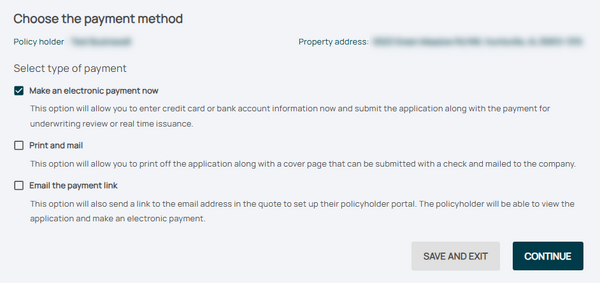
- Review the pre-filled details, including:
 * Policy number
 * Premium amount
 * Payment due date

3: Follow-up
* Provide payment information, such as:
 * Credit card details
 * Bank routing and account numbers
- Confirm the payment amount matches the premium due.
