<big>'''Make Changes to Coverage and Deductibles'''</big><br>
<big>'''Make Changes to Coverage and Deductibles'''</big><br>
Changes to email address, phone number, and mailing address.<br>
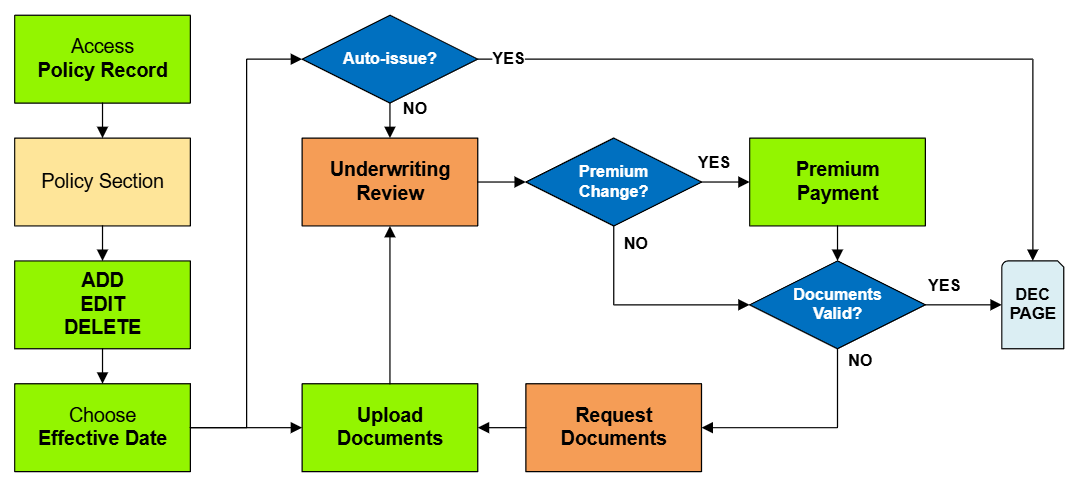
Changes to coverage must follow NFIP guidelines for [[Effective Date]] calculation and documentation.<br>
{{Attention|If the mailing address is used to verify '''[[Primary Residence]]''', then it cannot be changed until a document has been submitted in its place.}}
Refer to the boxes below to confirm proper calculation and required documents.
}}
}}
<big>'''Coverage Change Rules'''</big><br>
<big>'''Coverage Change Rules'''</big><br>
<div style="margin-top:10px;">'''Once all details are entered, click the "Save" button (move to Step 3 below).'''</div>
<div style="margin-top:10px;">'''Once all details are entered, click the "Save" button (move to Step 3 below).'''</div>
Line 95:
Line 97:
'''''The Policy Change cannot be completed without choosing an effective date.'''''
'''''The Policy Change cannot be completed without choosing an effective date.'''''
<table class="wikitable">
<tr><th>Change Type</th><th>Effective Date Rule</th></tr>
<tr><td>Update Contact Details</td><td>Date of the request</td></tr>
<tr><td>Add Insured Name</td><td>Date of the request</td></tr>
<tr><td>Update Insured Name</td><td>Date of Request or Event</td></tr>
This procedure explains how agents can submit requests to change coverage amounts on an NFIP policy. Coverage changes include increases or decreases to building and contents coverage, as well as deductible changes. Supporting documentation may be required depending on the type of change.
Coverage Change Types
Type
Waiting Period Rules
Required Documentation
Coverage Increase
Standard Waiting Period or Exception
None
Coverage Decrease
None; can be applied to inception
Proof of over-insurance (e.g., property appraisal) or documentation of building damage.
Deductible Increase
None
None
Deductible Decrease
Standard Waiting Period or Exception
Statement from lender rejecting deductible amount
Procedural Steps
1. Access Policy Record
Use the "Policy Changes" menu along the right side of the page.