

Submit Change to NFIP Coverage: Difference between revisions
No edit summary |
No edit summary |
||
| Line 85: | Line 85: | ||
|title = Coverage Decrease | |title = Coverage Decrease | ||
|content = | |content = | ||
When coverage is reduced to zero, the corresponding deductible must be set to zero. | |||
Coverage decreases can be made on '''upcoming renewals''' without the requirements needed for policy changes. [https://www.fema.gov/sites/default/files/documents/fema_nfip_flood-insurance-manual_042024.pdf#page=148] | |||
{{Docs-req|1='''Building coverage''': proof the building is over-insured, either through error or removal. [https://www.fema.gov/sites/default/files/documents/fema_nfip_flood-insurance-manual_042024.pdf#page=145] }} | |||
{{Docs-req|1='''Duplicate RCBAP coverage''': copy of the RCBAP declarations page. }} | |||
{{Docs-req|1='''Contents coverage''': proof the property was sold or removed. [https://www.fema.gov/sites/default/files/documents/fema_nfip_flood-insurance-manual_042024.pdf#page=145] }} | |||
{{Docs-req|1='''Policyholder's signature''' [https://www.fema.gov/sites/default/files/documents/fema_nfip_flood-insurance-manual_042024.pdf#page=141] }} | |||
{{Attention|1=If due to error, the decrease is effective at inception. <br>If due to damage or removal, it is effective '''the day after''' the event date. [https://www.fema.gov/sites/default/files/documents/fema_nfip_flood-insurance-manual_042024.pdf#page=145] <br>If due to duplicate RCBAP building coverage, it is effective the date the RCBAP coverage started. [https://www.fema.gov/sites/default/files/documents/fema_nfip_flood-insurance-manual_042024.pdf#page=146]}} | |||
}} | }} | ||
{{collapsible-details | {{collapsible-details | ||
| Line 91: | Line 99: | ||
|title = Deductible Increase | |title = Deductible Increase | ||
|content = | |content = | ||
When coverage is increased from zero, a deductible must be chosen. | |||
{{Attention|Deductible increases have no '''[[Waiting Period]]'''.}} | |||
{{Attention|'''[[ | |||
}} | }} | ||
{{collapsible-details | {{collapsible-details | ||
| Line 99: | Line 106: | ||
|title = Deductible Decrease | |title = Deductible Decrease | ||
|content = | |content = | ||
{{Docs-req|1=A '''lender's letter''' that requires a lower deductible [https://www.fema.gov/sites/default/files/documents/fema_nfip_flood-insurance-manual_042024.pdf#page=147] }} | |||
{{Docs-req|1=[[Premium Payment]] }} | |||
{{Attention|'''[[NFIP Effective Date Calculation]]''' rules apply to coverage increases that can alter the requested effective date.}} | |||
{{Docs-req|1=''' | |||
{{Docs-req|1= | |||
{{ | |||
}} | }} | ||
{{collapsible-details | {{collapsible-details | ||
Revision as of 14:17, 11 March 2025


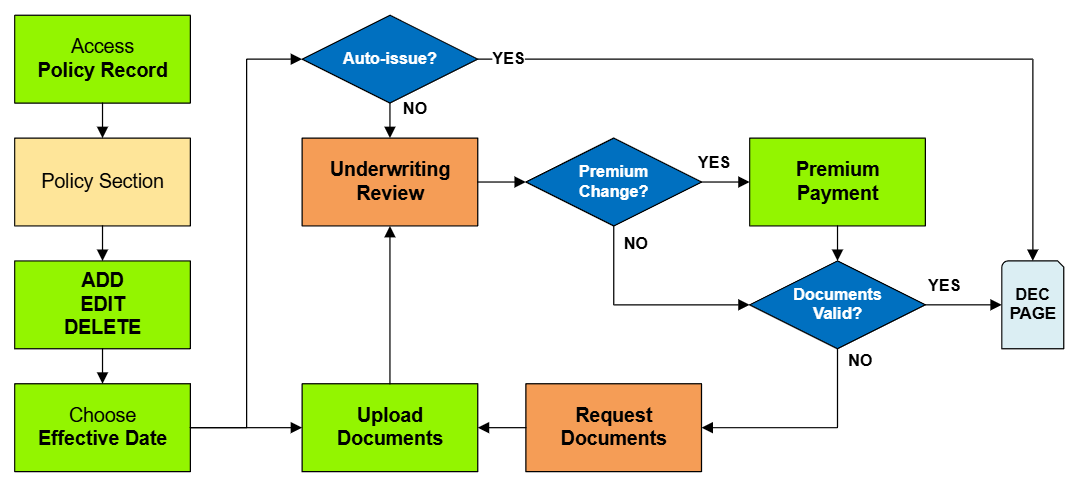
This procedure explains how agents can submit requests to change coverage amounts on an NFIP policy. Coverage changes include increases or decreases to building and contents coverage, as well as deductible changes. Supporting documentation may be required depending on the type of change.
|
Coverage Change Types
| Type | Waiting Period Rules | Required Documentation |
|---|---|---|
| Coverage Increase | Standard Waiting Period or Exception | None |
| Coverage Decrease | None; can be applied to inception | Proof of over-insurance (e.g., property appraisal) or documentation of building damage. |
| Deductible Increase | None | None |
| Deductible Decrease | Standard Waiting Period or Exception | Statement from lender rejecting deductible amount |
Procedural Steps
1. Access Policy Record

To quickly navigate to the Coverages and Deductibles section:
- Find the Policy Actions block on the right
- Choose Policy Changes
- From the next menu, click the Coverages and Deductibles option
2. Edit Coverage

This will open the coverage fields for editing.

Changes to coverage must follow NFIP guidelines for Effective Date calculation and documentation.
Coverage Change Rules
Required Documentation: Premium Payment
Coverage decreases can be made on upcoming renewals without the requirements needed for policy changes. [1]
Required Documentation: Building coverage: proof the building is over-insured, either through error or removal. [2]
Required Documentation: Duplicate RCBAP coverage: copy of the RCBAP declarations page.
Required Documentation: Contents coverage: proof the property was sold or removed. [3]
Required Documentation: Policyholder's signature [4]
Required Documentation: A lender's letter that requires a lower deductible [7]
Required Documentation: Premium Payment
3. Choose Effective Date

Scroll to the top of the page to enter the effective date.
- Choose the Waiting Period based on the scenarios identified in Section 3.
- Enter the appropriate date based on Section 3.
4. Review and Submit
Once the effective date is entered, click the Issue button.
- The "Abort" button will exit without saving any details.

The system will process the change immediately.
- A Declarations page with the updated information will be available in the Documents section of the Policy Record.
- If a Renewal Notice exists and the policy has not expired, then a new Renewal Notice will be sent.
