Create NFIP Application: Difference between revisions
No edit summary |
No edit summary |
||
| Line 25: | Line 25: | ||
|content = | |content = | ||
To quote a property with the [[NFIP]], start in the [[Agency Workspace]]. | To quote a property with the [[NFIP]], start in the [[Agency Workspace]]. | ||
{{img-proc-frm | {{img-proc-frm | ||
|file = File:Img-eq-app-01.png | |file = File:Img-eq-app-01.png | ||
Revision as of 11:09, 9 December 2024



An agent must complete several steps to produce an NFIP application or obtain a quote. Equinox ensures that all required information is collected and validated before the application is submitted. This process is designed to reduce errors and enhance efficiency by guiding the agent through a series of steps that ensure compliance with NFIP guidelines.
|
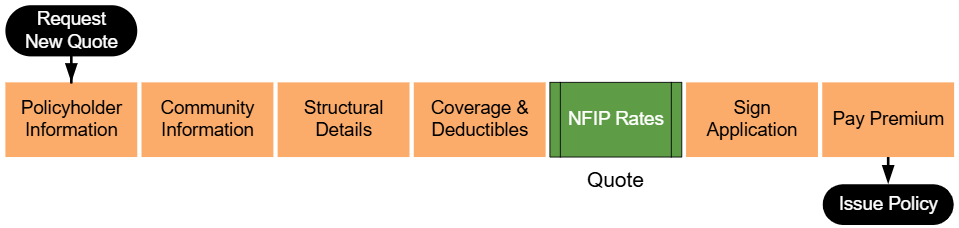
The workflow shown above begins by entering basic property details and continues through collecting additional information about the building, coverage options, and flood zone determinations. At the "NFIP Rates" step, highlighted in green, agents can generate a preliminary quote based on the details provided. This allows the agent to review potential costs before signing the application and collecting premium.
 Information Icons Information Icons
|
Equinox has small information icons placed next to important sections or fields. When a user hovers over an icon, a small window provides extra details about that section. The messages from these icons can be found in the collapsible sections below.
|
A. Request New Quote

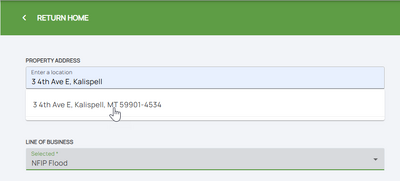
B. Property Address
Choose "NFIP Flood" from the second drop down window.
C. Step 1: Basic Information
From this point forward, the right side of the page will show a page completion list with the quote/application progress.
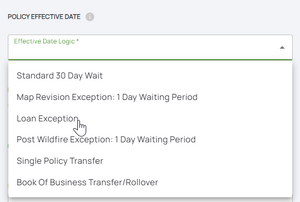
NFIP quotes are made in real time and rates are subject to change. All quotes must follow the NFIP waiting period rules assigned to new policies. For more information about each waiting period rule and how to calculate the application effective date, refer to the NFIP Effective Date Calculation.
NFIP Policy Effective Dates- Map Revision: A 1-day waiting period may apply if there's been a map provision and the property was previously in a B, C, X, or D zone and is now in an A1 through A30 or V1 through V30 zone. The rezoning must have occurred no more than 13 months prior to today's date.
- Loan Exception: If this policy is being purchased to meet a lender requirement for a new purchase, loan closing, or the increasing, extending, or renewing of a loan, the policy will go into effect at the time of closing provided the application and premium are received in a timely manner.
- Post-Wildfire Exception: A 1-day waiting period applies if the insured property is privately owned and post-wildfire conditions on federal lands caused or worsened the flooding. The insured must have purchased the new policy or additional coverage on or before the fire containment date or during the 60 days following the containment date.
D. Step 2: Third Party Data
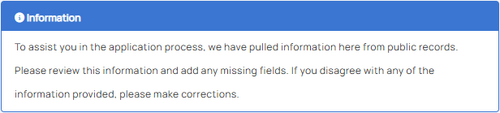
Agents should review all data for accuracy and manually input any missing or inaccurate information.
 Date of Construction Number of Floors
- A building with a basement and one floor above ground is rated as having one floor.
- An elevated building with an enclosure either compliant or non-compliant and one additional floor above it is rated as having one floor.
Square Footage- Garage area
- Basement or enclosure area
- Porches or decks
Building Replacement Cost Value Substantial Improvement Date- Improvements to correct code violations
- Alterations to historic buildings that preserve their designation
Construction Type- Frame: First floor above ground level is constructed with wood or metal frame walls.
- Masonry: First floor above ground level is constructed with masonry, including brick or concrete block walls for the full story.
- Other: Includes mixed materials or specific exceptions like knee walls.
NFIP Participating Community Information: This section shows NFIP community classifications and program details such as regular, emergency, non-participating, or suspended status.
Coastal Barriers and Protected Areas (CBRS/OPA): Yes/No fields determine if the property falls within Coastal Barriers Resource System (CBRS) or Otherwise Protected Areas (OPA). These options impact eligibility and policy requirements.E. Step 3: Property Information
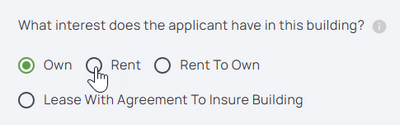
F. Step 4: Building Type
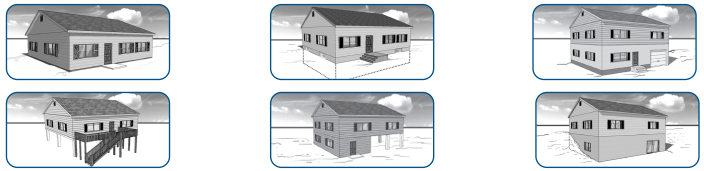
G. Step 5: Foundation Type
Agents must also answer a single question about the number of elevators in the building.
H. Step 6: Elevation Certificate Information
I. Step 7: Qualifying Questions
J. Step 8: Coverage, Deductibles & Discounts
Discount Eligibility
Agents must answer questions to determine eligibility for specific NFIP discounts, such as:
- Prior policy status, including lapses for Newly Mapped or Pre-FIRM discounts.
- The elevation of essential equipment, such as air conditioners, water heaters, and elevator machinery, above the first-floor elevation.
K. Step 9: Rates
Agents must:
- Review the itemized premium amounts and verify accuracy.
- Enter any of the additional details:
- Insured mailing address
- Additional insureds
- Mortgagee information
- Agent of record
- Provide any additional relevant details in the text box for supplementary information.
- Electronically sign the document.
Next Steps
Once all steps are finished, the NFIP Application is complete.
The next step for Equinox to issue the policy would be to submit premium payment.