

Premium Payment: Difference between revisions
| Line 12: | Line 12: | ||
<gallery mode="packed" heights="300px" style="text-align:left"> | <gallery mode="packed" heights="300px" style="text-align:left"> | ||
Img-proc-pay-dialog-card.png|Required credit card fields are outlined in red | Img-proc-pay-dialog-card.png|<small>Required credit card fields are outlined in red</small> | ||
Img-proc-pay-dialog-echeck.png|Required electronic check fields are outlined in red | Img-proc-pay-dialog-echeck.png|Required electronic check fields are outlined in red | ||
</gallery> | </gallery> | ||
| Line 20: | Line 20: | ||
<gallery mode="packed-hover" heights="240px" style="text-align:left"> | <gallery mode="packed-hover" heights="240px" style="text-align:left"> | ||
Img-proc-pay-dialog-card.png|Required credit card fields are outlined in red | Img-proc-pay-dialog-card.png|<small>Required credit card fields are outlined in red</small> | ||
Img-proc-pay-dialog-echeck.png|Required electronic check fields are outlined in red | Img-proc-pay-dialog-echeck.png|Required electronic check fields are outlined in red | ||
Img-proc-pay-dialog-card-filled.png|Required fields after they are filled | Img-proc-pay-dialog-card-filled.png|Required fields after they are filled | ||
Img-proc-pay-dialog-change.png|Policy changes allow the user to cancel and return to the policy | Img-proc-pay-dialog-change.png|Policy changes allow the user to cancel and return to the policy | ||
</gallery> | </gallery> | ||
Revision as of 10:09, 5 March 2025
Premium payments are easy to make in Equinox, and they can be initiated a number of ways.
- Pay NFIP New Business - submit payment for a completed NFIP application
- Pay NFIP Renewal - provide payment to renew an upcoming NFIP policy term
- Pay NFIP Policy Change - make additional premium payments for NFIP policy changes
No additional fees are added to premium payments.
How to Submit Premium Payments
To make a premium payment, follow these steps.
This process is different for policyholders who make a payment through the Consumer Portal.
-
 Required credit card fields are outlined in red
 -
 Required electronic check fields are outlined in red


Payments can be made using a credit card or an electronic check (e-check or echeck).
Select the corresponding box for each at the top of the screen. This will adjust the form fields below.
-
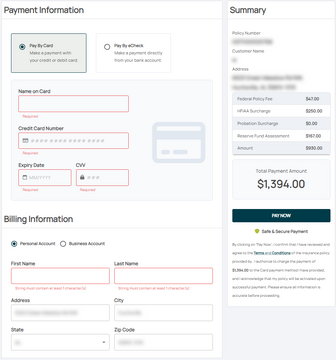 Required credit card fields are outlined in red
 -
 Required electronic check fields are outlined in red
 -
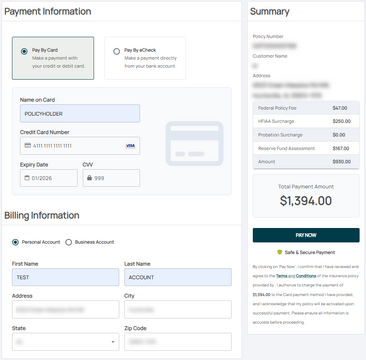 Required fields after they are filled
 -
 Policy changes allow the user to cancel and return to the policy

