

Policy Actions
The Policy Actions widget on the Policy Record page provides a list of tasks agents can perform to manage policies. Each action simplifies the maintenance of accurate and up-to-date policy records.
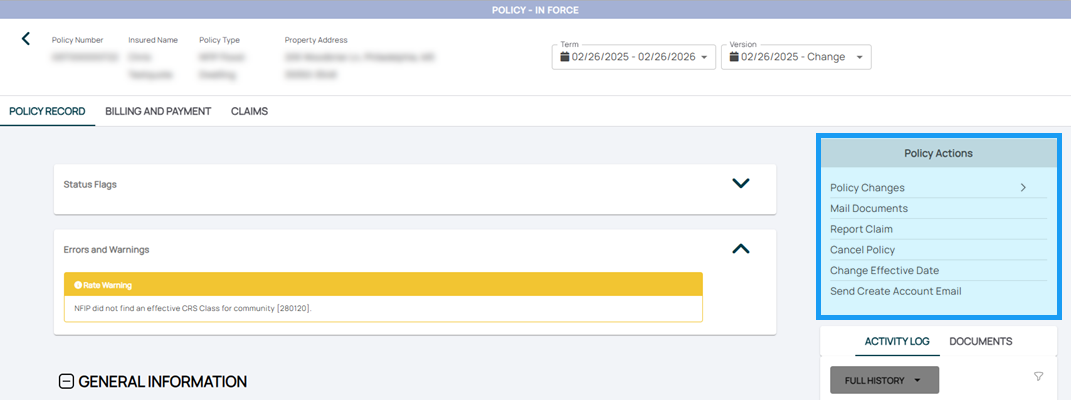
1. Policy Changes
Submit changes to a policy, such as lender clauses, coverage adjustments, or insured details.

Key Steps:
- Access the Policy Record.
- Select the Edit Policy option.
- Enter the desired changes and review for accuracy.
- Submit the changes
Based on the type of procedure, the system will programmatically direct a policy towards transaction auto-issuance ("Green Path") or underwriter review ("Yellow Path").
2. Mail Documents
Send policy-related documents to policyholders, agents, or third parties.
Key Steps:
- Go to the Documents section of the Policy Record.
- Select the documents to send.
- Use the built-in mailing tool to complete the action.
3. Report Claim
Initiate a claim on behalf of a policyholder.
Key Steps:
- Access the Claims tab of the Policy Record.
- Select Report Claim and fill in required details.
- Submit the claim for processing and follow up as needed.
4. Cancel Policy
Cancel an active policy due to non-payment, request, or other reasons.
Key Steps:
- Open the Policy Record.
- Navigate to Cancel Policy and complete the required details.
- Submit for review or finalization.
5. Change Effective Date
Feedback Needed:
6. Send Create Account Email
Assist policyholders in setting up their Consumer Portal accounts.
Key Steps:
- Go to the policyholder’s contact details.
- Select Send Create Account Email.
- Ensure the policyholder receives and completes the registration.